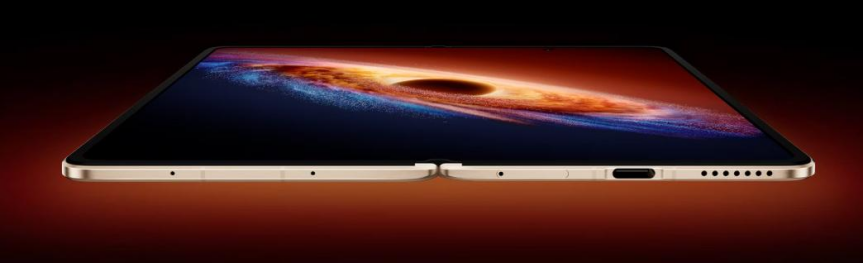
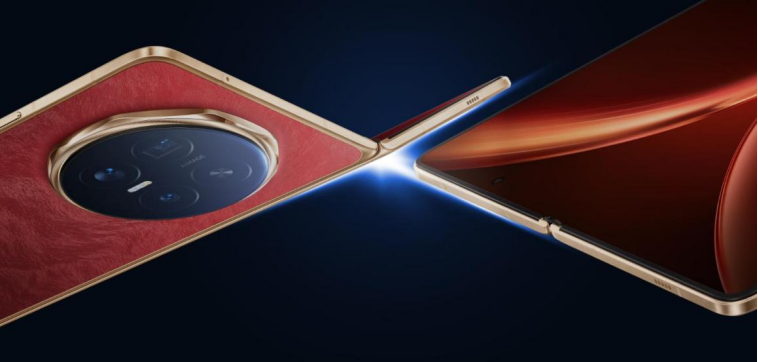
Foldable smartphones turn a one-pocket device into a compact productivity hub. The flexible design opens into a tablet-like screen, giving users more room to work, watch, and create without carrying extra gadgets. With larger displays, advanced multitasking tools, and smart software, these phones help people move faster between tasks and stay organised during busy days. Students, remote workers, and content creators gain practical benefits, such as better app layouts, easier note-taking, and smoother video calls. As more brands refine their designs, foldables now deliver stronger multitasking performance, longer battery life, and polished interfaces that feel natural, intuitive, and efficient.
Foldable Smartphone Features That Improve Multitasking Performance
Larger Foldable Displays Create More Workspace
A foldable smartphone’s main advantage lies in its larger, tablet-style display. When unfolded, the screen provides enough space to view full webpages, long documents, and detailed spreadsheets without constant zooming. Users can read emails on one side and view attachments clearly on the other. Video editors, designers, and gamers benefit from more visual details and larger touch controls. The extra space also makes typing more comfortable, reducing mistakes on the on-screen keyboard. Compared with standard phones, foldables show more content at once, which cuts down on scrolling. This expanded workspace helps users focus longer, see information in context, and move through tasks confidently.
Split-Screen Functionality Helps Users Run Multiple Apps
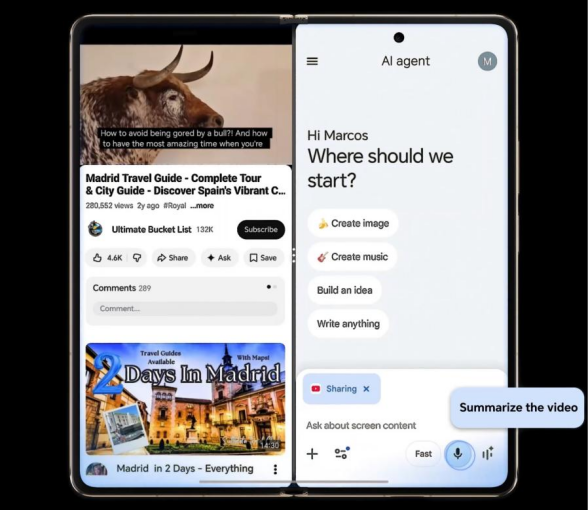
Split-screen multitasking turns HONOR Magic V6 into a mini workstation. Users can place two or even three apps side by side, each running in a separate window. One common setup keeps email on one panel and a calendar on another to schedule meetings quickly. Students might keep a digital textbook open while taking notes in a document app. Social media managers can draft posts while tracking live analytics in parallel. Many foldable interfaces let users adjust window sizes with a quick drag, giving more space to the main task. This flexible layout reduces the need to keep switching apps, which saves time and improves focus.
Floating Windows and Drag-and-Drop Features Save Time
Floating windows add another layer of multitasking power to foldable phones. Users can open small, resizable windows for messaging, calculators, or music controls that float above other apps. This layout keeps important tools visible without blocking the main screen. Drag-and-drop support makes moving content faster and more intuitive. You can drag text from an email into a notes app, drop photos directly into a presentation, or move files from cloud storage into a chat. Many foldables support dragging items with one hand while holding the device open with the other. These features cut down on taps, menus, and copy-paste steps, streamlining everyday workflows.
Smart Software Features That Support Everyday Productivity
App Continuity Creates Seamless Transitions Between Screens
App continuity ensures that apps adapt instantly when users open or close the foldable display. Start reading an article on the smaller outer screen, unfold the device, and the content immediately expands to the larger display without reloading. Messaging threads, videos, and documents continue smoothly across both modes. This seamless flow encourages natural use of both screens instead of forcing awkward restarts. Some systems also remember the last layout, so when users reopen a closed phone, their apps appear exactly as before. This continuity helps professionals switch from quick checks on the go to deep work on a larger canvas with zero friction or confusion.
Flexible Viewing Modes Improve Meetings, Reading, and Note-Taking
Flexible viewing modes turn foldable smartphones into versatile tools for daily tasks. In “laptop” or “flex” mode, the device bends at an angle, letting users place it on a desk for hands-free video calls during meetings. The top portion shows participants, while the bottom can display controls or notes. Reader-friendly modes reduce distractions and adjust layout for comfortable reading, useful for ebooks and long reports. Some foldables let users write with a stylus on one panel while viewing reference material on the other. This dual-view approach improves note-taking during classes, webinars, or conferences, creating a compact, adaptable setup that fits different working and learning situations.

AI-Powered Tools Help Manage Tasks More Efficiently
AI-powered features in foldable smartphones enhance multitasking by handling routine, time-consuming steps. Smart assistants can summarise long emails, suggest replies, and highlight key dates or tasks. Voice commands let users launch split-screen setups, start timers, or open specific documents while their hands stay busy. Some systems predict frequently used app pairs, such as notes and browser, and offer one-tap shortcuts to open them together. AI can also optimise window layouts based on habits, placing the main work app in the best position on the large screen. Combined with on-device translation, transcription, and image recognition, these intelligent tools help people focus on decisions instead of manual organisation.
Conclusion
Foldable smartphones bring together hardware and software upgrades that directly support modern multitasking needs. Larger displays provide a comfortable workspace, while split-screen views, floating windows, and drag-and-drop tools streamline workflow. Smart features such as app continuity, flexible viewing modes, and AI assistance reduce friction and automate repetitive steps. These improvements benefit professionals, students, and casual users who juggle messages, content, and meetings throughout the day. As designs mature and more apps optimise for foldable layouts, these devices become reliable everyday companions. For anyone who wants a single device that handles both entertainment and serious work, foldable smartphones present a compelling option.